This minimun data is represented basically by objects like layers, linetypes, text styles, etc. Due that you have layer 0, stadard text style, continuous linetype and others.
How data is stored
This Database mantains all sort of objects a drawing needs to exist. These objects are stored into appropriate containers which are special objects made to manage objects of the same type. This way we have appropriate methods and procedures to store entities, layers, text styles, etc.
Each object stored into Database receives an identifier that is called ObjectId. This identifier is unique inside the same AutoCAD session and it is valid during the lifecycle of each object. The ObjectId is generated by its Database and you don't need to worry about how to create it.
Inside ObjectARX we have basically 3 kind of objects:
- Entities: Objects with graphical representation (lines, arcs, texts, ...);
- Containers: Special objects to store and manage collections (layer table, linetype table, ...);
- Objects: Objects without any graphical representation (groups, layouts, ...).
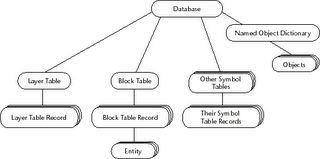
AutoCAD's Database structure
Creating objects
To create an object through ObjectARX we have some kind of recipe depending on what type of object it is and where we would like to store it (most of time we need to store an objects inside its specific container). Basically, you will follow this sequence:
- Declare a pointer to the object type you would like to create and call its new operator;
- With this pointer, call appropriate methods of this object to change its features;
- Get a pointer to the Database where you would like to create the object (most of time the current Database);
- Open the appropriate container where it should be stored;
- Call the specific container method to store your object passing its pointer;
- Receive its ObjectId automatically generated by its container;
- Finish the operation closing all opened objects including containers and the object you have just created.
Obviously you will create some handy classes to allow the automation of this processes because they are very similar and can be easily reused. The main idea is to create a sort of database utility funcions like: AddLayer, AddLine, AddCircle, AddTextStyle, etc.
* It is very important to not forget to close opened objects because this will cause AutoCAD to terminate.
Sample code to create a line (AcDbLine)
This code demonstrates how to create a simple line between two points. The process is simple and no error check is made. This code needs to be embedded inside an ObjectARX application structure to work. The main idea is to show you the concepts. Further we will create a working code. Pay attention to the order of opening and closing operations.
// We first need to declare a couple of points
AcGePoint3d startPt(1.0, 1.0, 0.0);
AcGePoint3d endPt(10.0, 10.0, 0.0);
// Now we need to instantiate an AcDbLine pointer
// In this case, its constructor allows me to pass the 2 points
AcDbLine *pLine = new AcDbLine(startPt, endPt);
// Now we need to open the appropriate container which is inside BlockTable
AcDbBlockTable *pBlockTable = NULL;
// First, get the current database and then get the BlockTable
AcDbDatabase* pDB = acdbHostApplicationServices()->workingDatabase();
pDB->getSymbolTable(pBlockTable, AcDb::kForRead);
// Inside BlockTable, open the ModelSpace
AcDbBlockTableRecord* pBlockTableRecord = NULL;
pBlockTable->getAt(ACDB_MODEL_SPACE, pBlockTableRecord, AcDb::kForWrite);
// After get ModelSpace we can close the BlockTable
pBlockTable->close();
// Using ModelSpace pointer we can add our brand new line
AcDbObjectId lineId = AcDbObjectId::kNull;
pBlockTableRecord->appendAcDbEntity(lineId, pLine);
// To finish the process we need to close ModelSpace and the entity
pBlockTableRecord->close();
pLine->close();
On the next class we will present the ObjectARX application structure and will build and compile a simple application using the above code. See you there!


49 comments :
Hello,
Should I delete the AcDbEntity pointer?
Why you don't close the AcDbDatabase pointer?
Hi there!
1)You only should delete those pointers you have allocate but not added to database. Once you have add an object to database AutoCAD take control of its lifecycle and you only need to close it.
2)The AcDbDatabase pointer is managed by AutoCAD and it stay opened as long as its associated drawing is available. You should only delete AcDbDatabase pointer when you have allocate it and it is not attached to any opened document inside AutoCAD application environment.
Hi Fernando,
Here is what I did base on your code sample.
// ----- lesqsimpleLine._MyLine command (do not rename)
static void lesqsimpleLine_MyLine(void)
{
acutPrintf("\nSimple Line Command in ObjectARX...");
int iRet;
AcGePoint3d startPt, endPt;
iRet = acedGetPoint(NULL , "\nFrom point:" , asDblArray(startPt) );
if (iRet == RTNORM)
{
iRet = acedGetPoint(asDblArray(startPt) , "\nTo point: " , asDblArray(endPt) );
if (iRet == RTNORM)
{
AcDbLine *pLine = new AcDbLine(startPt, endPt);
AcDbBlockTable *pBlockTable = NULL;
AcDbDatabase* pDB = acdbHostApplicationServices()->workingDatabase();
pDB->getSymbolTable(pBlockTable, AcDb::kForRead);
AcDbBlockTableRecord* pBlockTableRecord = NULL;
pBlockTable->getAt(ACDB_MODEL_SPACE, pBlockTableRecord, AcDb::kForWrite);
pBlockTable->close();
AcDbObjectId lineId = AcDbObjectId::kNull;
pBlockTableRecord->appendAcDbEntity(lineId, pLine);
pBlockTableRecord->close();
pLine->close();
}
else { acutPrintf("\nNo second point selected..."); }
}
else { acutPrintf("\nNo first point selected..."); }
Hi,
I did not test your code but it looks good.
Keep improving!
BTW, I will request those users who would like to submit their improved samples and post into a user files folder.
Regards,
Fernando.
Great,
Just let me know where that folder is going to be please.
Gracias,
Luis.
Hi Fernando & Luis,
There are code fragements designed by you two in this section. Can anybody tell me which environment this code fit? is it a Visual C++ one?
Best Regards,
Yang
Hi Yang,
Yes, these code fragments are in C++ targeting ObjectARX 2004 and above.
You need to use VC++.NET 2002 to create ObjectARX applications compatible with AutoCAD 2004, 2005 and 2006.
Regards,
Fernando
Hello Rebekh,
Major ObjectARX contents on the Internet are placed into Forum Groups and Blogs. There are a couple of books about ObjectARX at Amazon.com
Only free sources I known is my Blog and Kean's Blog (http://through-the-interface.typepad.com/). VC++ information can be found at Microsoft MSDN website.
Hope this helps.
Regards.
Hi,
Take a look at Class3a. You need to setup VS to know both \inc and \lib ObjectARX paths.
Regards,
Fernando.
Hello
How can I acess, add or modify from program, entries made in Drawing Properties... on the Custom tab?
Regards
Hi,
There is a class to handle that. It is called AcDbDatabaseSummaryInfo and its pointer can be acquired with acdbGetSummaryInfo() global function.
If you need to access the same information from outside AutoCAD, there is an ActiveX control called DwgPropsX. Inside this control you will find several methods to put/get information.
Regards,
Fernando.
Hello
I have a class derived from AcDbDoubleClickEdit, and I have a class derived from AcDbEntity.
I use ...desc()->addX(AcDbDoubleClickEdit::desc() ... to add the double click reactor to the entity.
My goal is to modify some entity-s internal data in the database when the user double clicks on a specific entity.
But I can't open them in write mode, i get error eLockViolation .
Is there any way to overcome this obstacle?
Regards, Alonso
Hi Alonso,
If you are using AutoCAD 2007 the double click API is now part of CUI. Take a look at the .NET class:
Autodesk.AutoCAD.Customization.DoubleClickAction
If you are not using 2007, try to put the following code just before you open the entity for write:
AcApDocument *pDoc=acDocManager->curDocument();
acDocManager->lockDocument(pDoc,AcAp::kWrite);
After close the entity, unlock the document like this:
acDocManager->unlockDocument(pDoc);
Hope this help.
Regards.
Hello
Thx for the help, it really solved my problem.
Grateful, Alonso
Hello
I have an arx application and a custom menu wrote for AutoCAD 2006.
How can I load the custom menu from the application, without telling the user to use the AutoCAD command CUI?
Can you give me an example how to use DEMANDLOAD to set my arx application to load whenever AutoCAD starts?
I'm aiming to make an install kit for my program where I set everything, so the user simply starts AutoCAD and can use my menu and program.
Regards, Alonso
Hi Alonso,
The AutoCAD MENU and TOOLBARS can be manipulated directly through the COM API or through C# (.NET API). There is a sample at:
C:\ObjectARX 2007\samples\dotNet\CuiSamp
It shows how to create menus, toolbars, etc., using the .NET CUI API through C# (the same works if you use VB.NET).
Regarding to the demand loading process it is just a matter of registry entries. You can find more information about this on the ObjectARX SDK Help into "Demand Loading" topic.
Regards,
Fernando.
please send simple code of vb to integrete autocad database
to get the parameter of line
Hello Fernando,
I have a question:
[code]
AcDbObjectId lineId=AcDbObjectId::kNull;
pBlockTableRecord->appendAcDbEntity(lineId,pLine);
[/code]
Why don't you use function: appendAcDbEntity(pLine) ??
Regards,
Duy
Hi Duy,
In fact you are right but I prefer to use this other signature version which returns the new entity's objectId because would be a good idea to check if it is valid.
I have removed a lot of code check on these samples to provide a clear code and an easy understanding.
It is really up to you to choose the right signature to use.
Regards,
Fernando.
Dear Fernando,
Please how to determine if DB pointer is still valid.
In my case I have two DWG for example dwg1 and dwg2 when close dwg2 the pointer is invalid after close document so case terminate of program.
So what is the solution?
Is the solution using Reactor? Please give me any code sample if answer is yes?
Best Regards,
M.S
Hi M.S,
It is not a good idea to keep the pointers of databases. The best approach is to monitor the documents through a document reactor and then get each document attached database pointer.
Take a look at the docman sample of ObjectARX SDK.
Regards,
Fernando.
Dear Fernando,
I have this code it work but when replace activateDocument with setCurDocument at line 12 and 16 this code does not work (Terminate program)
(This code activate second dwg if first dwg is active and vise versa)
AcDbVoidPtrArray *m_pDBArray = acdbActiveDatabaseArray();
if(m_pDBArray->length() == 2)
{
AcDbDatabase *pDb1 = (AcDbDatabase *)(m_pDBArray->at(0));
AcDbDatabase *pDb2 = (AcDbDatabase *)(m_pDBArray->at(1));
AcApDocument *pDoc0;
AcApDocManager *doc_manager = acDocManagerPtr();
pDoc0 = doc_manager->curDocument();
AcDbDatabase *pDbTemp0 = pDoc0->database();
If(pDbTemp0 == pDb1)
{
AcApDocument *pDoc;
pDoc = doc_manager->document(pDb2);
Acad::ErrorStatus error11= doc_manager->activateDocument(pDoc);
}
else if(pDbTemp0 == pDb2)
{
AcApDocument *pDoc;
pDoc = doc_manager->document(pDb1);
Acad::ErrorStatus error11= doc_manager->activateDocument(pDoc);
}
}
else
{
acutPrintf("\n Number of DWG less than 2");
}
Do you have any idea?
Regards,
M.S
Hi M.S,
Activate a document and make a document current are not the same thing. I would recommend you to read the ObjectARX documentation on the MDI section which explains in details what each concept is.
There are some restrictions that are valid to activate a document and others to set a document current.
Regards,
Fernando.
Hi,
I have plane AutoCad 2008 and AutoCad Map 2009 on the same machine.
Arx's with the line
AcDbDatabase* pDB = acdbHostApplicationServices()->workingDatabase();
can not be loaded in 2008 "cannot find a procedure that it needs"
but well in Map
Any idea's?
Hi Jelena,
Really strange.
All 2009 based products should be binary compatible with 2008 compiled ObjectARX applications.
Did you test with a simple empty project created with ARXWizard?
Regards,
Hi Fernando,
Empty project made with ArxWizard works fine. Although, other arx projects not involving the line with
"acdbHostApplicationServices()->workingDatabase();"
are also working fine (like your MinimumApp).
Temporary it’s no problem since I can work with Map.
I'll post if I find something on this matter.
Hi Fernando,
I have objectIDs of some drawn entities..I want to create block of that entities..What should I do??
Thanks in Advance..
shripad,
The process consist of two steps:
1) Create a BlockTableRecord to store the desired entities. At this step you will provide a unique name for the BlockTableRecord and will receive its ObjectId after created it.
// Get the block table.
AcDbBlockTable *pBlockTable = NULL;
acdbHostApplicationServices()->workingDatabase()->getSymbolTable(pBlockTable, AcDb::kForWrite);
// Create and name a new block table record.
//
AcGePoint3d oPt(0,0,0);
AcDbBlockTableRecord *pBlockTableRec = new AcDbBlockTableRecord();
pBlockTableRec->setName(_T("YourBlockName"));
pBlockTableRec->setOrigin(oPt);
// Add the new block table record to the block table.
//
AcDbObjectId blockTableRecordId;
pBlockTable->add(blockTableRecordId, pBlockTableRec);
pBlockTableRec->close();
pBlockTable->close();
2) With the BlockTableRecord ObjectId, use the deepCloneObjects() method as follows:
// This is the array of ObjectId you will obtain
AcDbObjectIdArray arrObjectID;
AcDbIdMapping idMap;
acdbHostApplicationServices()->workingDatabase()->deepCloneObjects(arrObjectID, blockTableRecordId, idMap);
This is the outline process. I have not tested it but it should work.
Regards,
Fernando.
Hello Fernando !
Im here to asking for helps or some suggestions plz !
I got an error when calling an compiled help files (.CHM) in AutoCAD 2000,it says "The file you called isn't a Windows help file or has been corrupt。
I got the same errors when i using .CHM files in AutoCAD 2005 or others
I've found the codes and tips in setfunhelp functions but this is not work anyways
==============================
(defun c:test ()
(getstring "Press F1 for help on the foo command:")
)
(setfunhelp "c:test" "Help.chm" "Test01")
==============================
On the other hand , the .hlp compiled files work properly when calling out in AutoCAD
==============================
Could it be done in ObjectARX ? Mr Fernando !
Hello,
Can you open this CHM file with a double click?
Windows consider CHM file as risky documents so when you try to open them from a network share or when you copy it from another computer it is locked by default.
If it is the case, you need to right click the file into Windows Explorer, go to its properties and unlock the file.
Regards,
hi fernando , i can open the CHM file with double click, but i can' found any properties setup or unlock likey options in any chm files, i guess there is format or support problem in windows xp
how do i fix the chm format problem, how do i updates them ?
Plz needs some advice .
Sorry, I have no clue about that.
One thing you can check is if the API you are using is compatible with the CHM version. One good test would be creating a standalone EXE application to open this CHM file. This will isolate the problem.
Regards.
void inserirBlocos(AcGePoint3d point, TCHAR *nomeBlock)
{
AcDbBlockTable *bt;
acdbHostApplicationServices()->workingDatabase()->getBlockTable(bt,AcDb::kForWrite);
AcDbBlockTableRecord *btr;
bt->getAt(ACDB_MODEL_SPACE, btr, AcDb::kForWrite);
bt->close();
AcDbBlockReference *br = new AcDbBlockReference(point, getIdBlockRec(nomeBlock));
AcDbObjectId idIns;
btr->appendAcDbEntity(idIns, br);
btr->close();
br->close();
}
and nothing appear on the screen!!
Hello,
First, you don't need to open the BlockTable for write to insert a block into the ModelSpace. Only the ModelSpace need to be opened for Write.
Second, if your method getIdBlockRec() try to open again the BlockTable for Write, it will fail once you already opened it for Write.
Third, the block must exist first into BlockTable before you can insert it into ModelSpace as a new BlockReference. I'm supposing your method create it.
Regards,
Keshan,
COPYCLIP is done via AcDbObject::wblockClone() where you will have access to the original object and the clone.
With this information you may block, tweak or update any information during clone process.
The second parameter is a pointer to the cloned object so I suppose if you delete it and pass back a NULL pointer it won't be cloned.
Haven't tried that but it should work.
Another possibility it to return something different from Acad::eOk as the ErrorStatus.
Let me know if it works.
Regards.
Hi,
Can you please tell me how to read existing dwg file?
Thank you in advance.
Kirti.
Hi kirti,
There is a sample under:
\ObjectARX 2010\samples\database\testdb_dg
It will show you how to do that.
Regards.
hey all , i want to disable wheel mouse double clicking by writing an arx or any other way , but i dont know how ! please can somebody help me ?
Hi, I have no idea how to do that.
Did you take a look at the acad.pgp customization file?
Have you tried the do it through CUI customization?
Regards,
Hello,
Why did you create an ObjectId to receive the new id if you won't use it?
Hello,
Actually AutoCAD database creates and returns the ObjectId when you append a new object to it.
The code just stores the returned value into a local variable. The ObjectId can be further used, into the same DWG session, to retrieve the Object pointer through a Open/Close operation.
It works like a database identification for the database client (our apps).
Regards,
This is the command to refresh the data:
void RefreshDB()
{
resbuf *rb_in = acutBuildList(
RTSTR, _T("c:wd_mdb_rebuild"),
RTNIL,
RTNONE);
resbuf *rb_out;
acedInvoke(rb_in, &rb_out);
acutRelRb(rb_in);
acutRelRb(rb_out);
}
But I want to refresh the parameters in the WFRM2ALL table how to do this?
Vũ Đinh Văn,
I have never worked with AutoCAD Electrical specific customization. Not sure which specific command you need to use to access a specific table.
If you can do it via .NET I would recommend you to use LINQ expressions to access the data but I'm not sure whether the MDB data is exposed through the .NET API or not.
Did you try to post this question at the ObjectARX Developer group?
http://discussion.autodesk.com/forum.jspa?forumID=34
Regards,
Is there anyone who can provide arx & dll file that can change AutoCAD 2014 Title Bar.
For example I want only "AutoCAD 2014" to appear.
gpa@inbox.com
Hello gpa,
I have never tried that but assuming Windows API does provide you access to all windows it should be possible. One thing I'm pretty sure is that AutoCAD will update the title every time you change the DWG file so I'm not sure how complicated to monitor that and change the title when it happens.
Regards,
Hello Fernando Sir,
I need help regarding autoCAD custom Drawing property. I have developed code using ObjectARX
in vs2010 c++ for get drawing properties and modify custom property.
I have loaded .arx file in autocad. but i didn't get what command is used for to fetch drawing property.
Thanks in advance.
Hello Netaj,
When you create an ARX application you need to register commands to be called from AutoCAD prompt.
These commands will then running your code and performing the tasks you have setup.
Take a look at the documentation about acedRegCmds->addCommand() and acedRegCmds->removeGroup(). These methods are called during the application initialization method acrxEntryPoint() where you will register and unregister commands.
If you look at the ObjectARX SDK samples you will find these methods.
Regards,
Post a Comment